DAADit Hosted MCP · Odoo 16 to 20
The best Odoo MCP server in the world
Your AI assistant works inside your own Odoo: looking things up, analysing, drafting and posting. You tick what it may do — per part of Odoo and per colleague.
Big words. Below you will see the screen where you set that up, and an honest comparison with the MCP server built into Odoo 20.

Ticking what the AI may do. That is all there is to it.
No configuration files, no technical work. This is the portal where your administrator sets up the connection — in plain language, grouped per app.
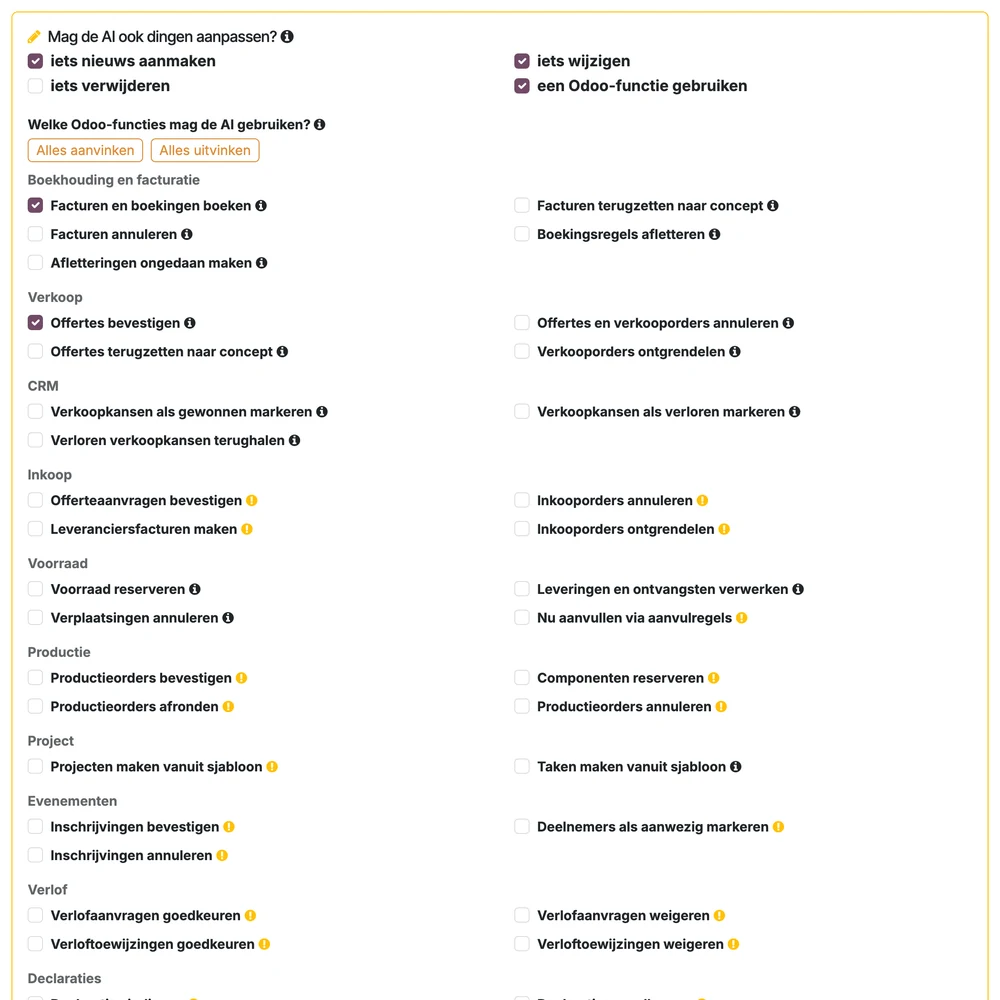
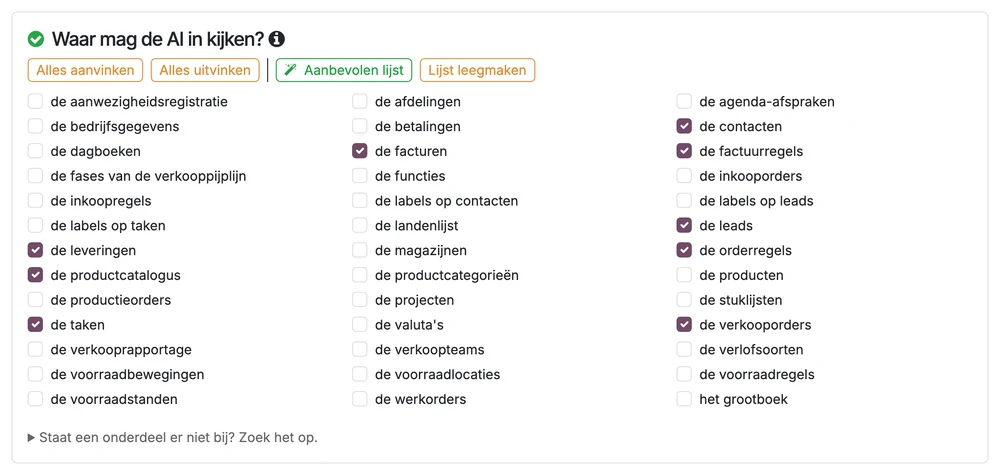
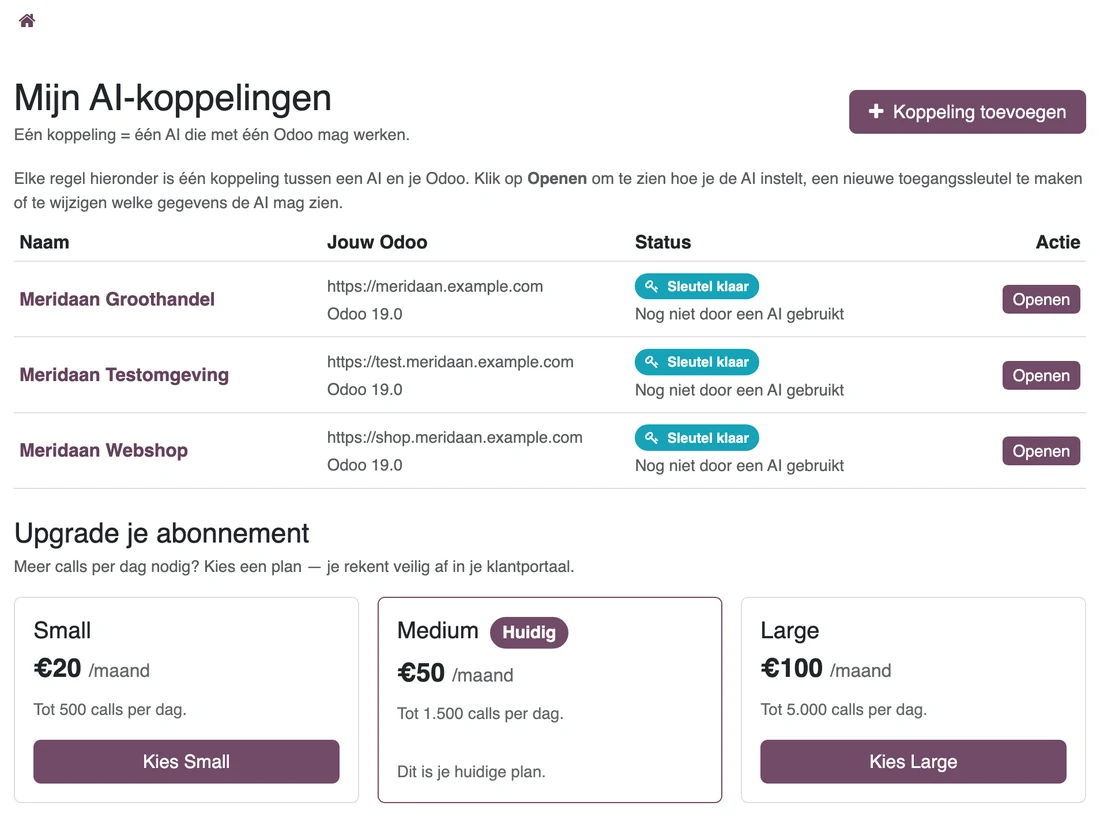
Screens from our own environment, with example data.
What the AI can do with it
Ten actions, each one on or off. Reading is on by default, writing is off.
Look up and read
Customers, orders, invoices, stock — the fields you release.
Build overviews
Group, count, compare. Without building a report first.
Create and change
A quotation, a task, a note. Only on what you tick.
Run functions
Confirm a quotation, post an invoice, leave a message.
Works with the AI you already use
MCP is an open standard. You connect these assistants and tools in a few minutes; for each one your portal has step-by-step instructions with the settings ready to paste. Claude.ai, ChatGPT and Le Chat sign in through the browser; the rest use an access key from your portal.
 Claude Desktop & Claude.aiAnthropic
 Mistral Le Chatpaid plan
 ChatGPTOpenAI
 Microsoft Copilot Studiobuild agents
- Microsoft 365 Copilotchat assistant
 CursorAI code editor
 Continue.devVS Code extension
 GooseBlock
- Claude CodeCLI
- VS CodeGitHub Copilot
 WindsurfCascade
 Gemini CLIGoogle
 n8nworkflow automation
- Otherany MCP client
Four things you rarely find elsewhere
It is our claim, not a certificate. You can check all four in a free account.
Per colleague, not per company
Everyone gets their own key and signs in with their own Odoo account. So your audit trail carries the real name, and you can revoke one person without touching the rest.
Shielding down to the field
May the AI see an employee record, but not the salary? Put that field on the block list and it disappears from every answer.
Evidence that survives an audit
Every call lands in a chain where each line covers the one before it. A deleted or altered line stands out. That is the difference between a log and evidence.
No upgrade needed
Still on Odoo 16 or 17, or on Community? Then this works today, without a migration and without installing anything in your Odoo.
The comparison
Odoo 20 MCP or DAADit Hosted MCP?
Odoo 20 ships an MCP server of its own, and it is good at what it does: letting the AI operate the Odoo 20 interface. We do something else — governed access to your data and your business functions, on every version from 16 onwards. The differences are below.
| Odoo 20 MCP (built in) | DAADit Hosted MCP | |
|---|---|---|
| Odoo version | Odoo 20 only | 16, 17, 18, 19 and 20 |
| Edition | Enterprise only | Community and Enterprise; Online, Odoo.sh and your own server |
| What to install | Upgrade to 20, switch on the AI app | Nothing. Connect with an API key from your own Odoo |
| Signing in | One static API key per user, in the AI client's configuration file | A separate token per colleague, stored encrypted; revoke per person |
| Permissions | The rights of the user behind the key | Those same rights, plus an allow list and a block list per part of Odoo and a personal limit per colleague |
| Privacy-sensitive fields | Cannot be shielded separately for MCP | Named fields are left out of every answer |
| Writing | Off by default; an administrator switches it on per server action | Off by default; the customer ticks functions in plain language, with fixed argument rules |
| Evidence afterwards | No audit trail documented | Every call recorded in a hash chain; IP addresses hashed and cleaned up |
| Capping usage | No limits documented | A limit per minute, per action and per batch, plus a daily budget per environment |
| Several environments | Connect each database separately | One URL for all your environments, or a separate URL per environment |
| Who manages it | An administrator in Odoo, under Technical · Server Actions | The customer, in a portal in plain language |
| Price | Included in Odoo Enterprise | Free up to 50 calls a day, then €20 to €100 per environment per month |
Source: Odoo 20 documentation, AI MCP server. Something no longer right? Let us know.
What it costs
Per Odoo environment, per month, excluding VAT. The only difference between the plans is the number of calls per day — every plan carries all functions and all security.
Medium
Most chosenSeveral departments, writing as well
€50 /month
1,500 calls a day
- Everything in Small
- Room for daily writing
Large
Heavy use or agents
€100 /month
5,000 calls a day
- Everything in Medium
- For agents picking up work themselves
The daily pool belongs to the environment and is shared by all colleagues. Your Odoo licence and your AI assistant's subscription you pay to those parties directly.
Live within a few minutes
Three steps. All you need is an Odoo environment reachable from outside, and a user with the rights you want to give the assistant.
01
Free account
An email address, done. No credit card, no sales call first.
02
Connect Odoo
Web address and API key in, and tick what the AI may do.
03
Add your assistant
Address and key into Claude, ChatGPT, Mistral or Cursor. Ask your first question.
Questions about the Odoo MCP server
Try it, and judge for yourself
A free account costs you a minute and no money. Rather talk it through first? Ask us a question, or read the technical documentation.
Create a free accountBack to AI- Odoo versions
- 16, 17, 18, 19, 20
- Editions
- Community and Enterprise
- Hosting
- Online, Odoo.sh, your own server
- Assistants
- Claude, ChatGPT, Mistral, Cursor
- Actions
- 10, each on or off
- Free plan
- 50 calls a day
- Paid from
- €20 per environment per month
- Processing
- In the EU, with a processing agreement